
October 2026 by Tony Phung.
What SQL is, in plain words
SQL is short for Structured Query Language. In practice, when people say “SQL” they usually mean the database that holds the business: patients, appointments, billing, inventory, staff logins, and the trail of who changed what.
Think of it as a very organized filing cabinet that many people use at once. Rows are records. Tables are drawers. Indexes are the tabs that help the system find a chart without flipping every page. When a tech opens a patient, when a schedule loads, when a report runs, the software is asking SQL for pieces of that data, then writing updates back. That back and forth never stops during a busy day.
SQL is foundational. Almost every practice system, ERP, and business app leans on a database like this under the hood. If SQL is slow, everything feels slow. If SQL is healthy, the rest of the stack has a chance.
Getting that health right is not a generic cloud click. It takes people who understand SQL workloads, big data patterns (lots of tiny reads and writes, plus large image files), and storage arrays that can keep up. That mix of expertise is how you get the best performance without guessing.
If your clinic or distribution team runs a busy SQL database alongside large ophthalmic images, you already know the feel of a “pig” system. Charts open late. Reports crawl. Staff click, wait, click again. Patients notice. You notice. And someone once said putting SQL on a hot tier in Azure would fix it.
Often it does not.
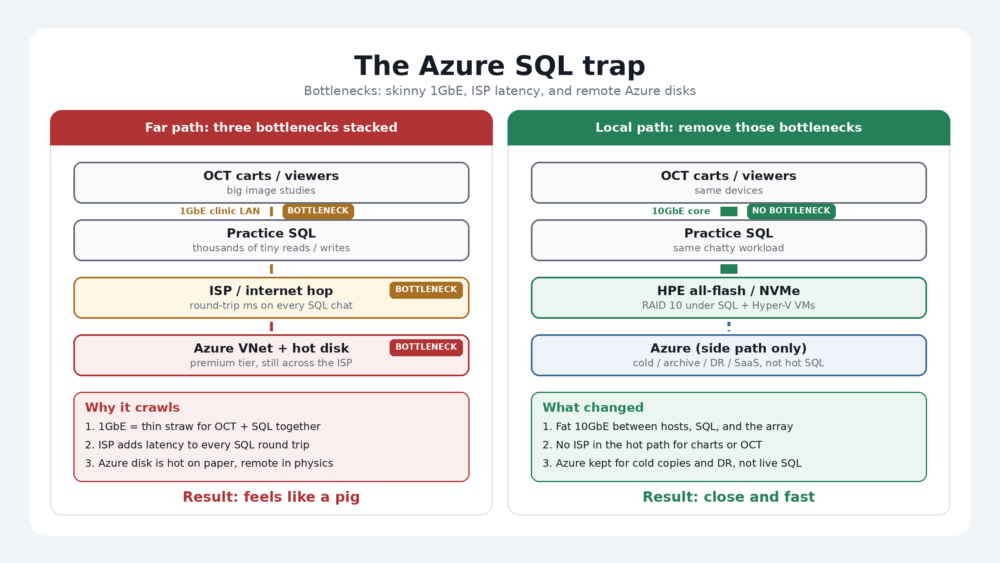
SQL cares about milliseconds. Imaging cares about big files moving without waiting in line. Put both behind a wide network hop, capped cloud disks, and a 1Gb backbone, and the stack fights you all day. The fix is not “more cloud.” It is the right home for the right data: fast local storage for SQL and active images, cloud for what cloud does well.
The Azure SQL trap
Azure is excellent at many jobs. Backup copies. Cold archives. Disaster recovery. SaaS apps. Burst capacity. None of that is the argument.
The trap is treating hot, chatty SQL like a file you can park on a “premium” disk in the cloud and expect it to feel local.
SQL Server (or any busy relational database) does thousands of tiny reads and writes. It is not one big download. It is a conversation. Every round trip across the internet, or through a virtual network with disk IOPS limits, adds lag. Staff feel that as freezes, spinning cursors, and “the system is slow today.”
For clinics and distributors that also store OCT and fundus studies, the pain stacks. Practice systems lean on SQL for patients, schedules, billing, and inventory. Imaging suites drop multi-megabyte (and larger) studies into a store that SQL or the app then has to find and open. When both live on latency-sensitive paths that were never built for that mix, the whole day slows down.
A prior IT firm may have meant well. “Hot tier in Azure” sounds modern. On paper it looks safe. In the chair, with techs waiting on SQL and doctors waiting on images, it can be a costly mismatch. No shame in saying that out loud. The fix is a better architecture, not a blame game.
What “fast” actually means
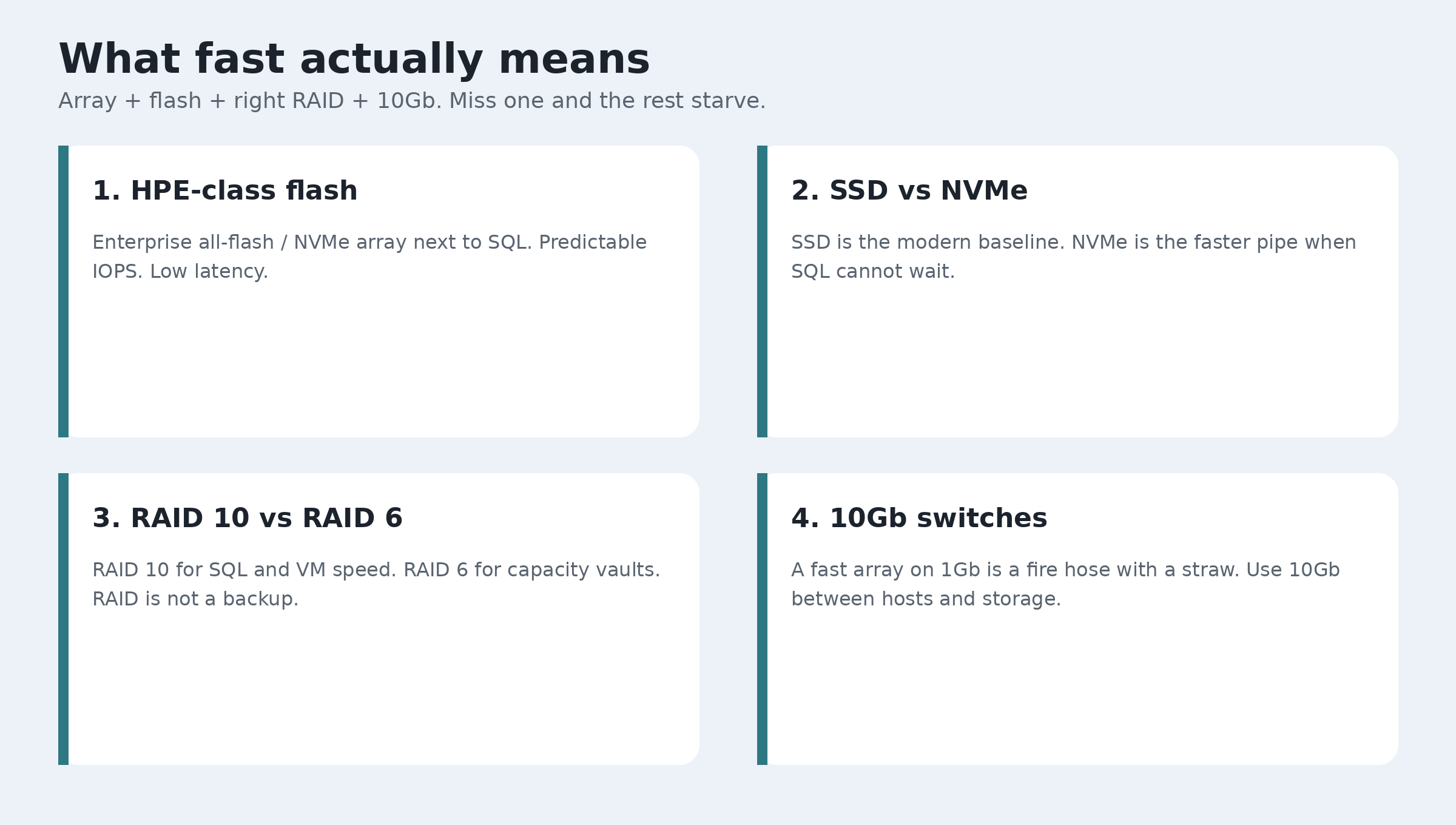
Four pieces work together. Miss one and the others starve.
An enterprise storage array (HPE class)
Think HPE Alletra-class (or similar all-flash / NVMe arrays), not a consumer NAS with a fancy sticker. These arrays are built for databases: lots of IOPS, low latency, snapshots, and clean paths to Hyper-V or Windows SQL hosts. We use that class of gear because SQL likes predictable, low-latency block storage close to the server.
The point for a business owner: big, fast, enterprise storage next to SQL, not a random disk in a VM.
SSD and NVMe
- SSD (solid state): No spinning platters. Much faster than old hard drives. Fine for many file shares and secondary roles.
- NVMe: Also flash, but with a faster pipe into the server or array. Lower wait time per IO. This is what you want under busy SQL data and log volumes when the budget allows.
Short version: hard drives are for bulk cold capacity. SSD is the modern baseline. NVMe is the “stop making SQL wait” tier.
RAID 10 and RAID 6
RAID is how disks protect each other. RAID is not a backup. You still need 3-2-1 backups, preferably with an immutable copy.
- RAID 10: Mirrors pairs of disks, then stripes across those pairs. You pay for more disks. You get speed and fast rebuilds. This is our default under VM disks and SQL when performance matters.
- RAID 6: Uses parity so you can lose two disks and keep running. Better dollars-per-terabyte. Slower writes than RAID 10 under heavy random IO. Good when space and budget matter more than peak SQL speed (archives, large image vaults that are not the SQL transaction path).
Our standard on the shop floor: RAID 10 for VM / SQL speed. RAID 6 when space and dollar matter more.
10Gb switches
A fast array behind 1Gb links is like a fire hose with a straw. Clinics often grow from “fine on gigabit” to “everything waits” once SQL chatter and image pulls share the same skinny pipes.
10GbE (or faster where needed) between Hyper-V hosts, SQL servers, and the storage array lets the hardware you paid for actually deliver. This is not vanity networking. It is how you stop the network from being the bottleneck.
When RAID 10 vs RAID 6
- SQL data + logs, Hyper-V VM disks: Prefer RAID 10. Random IO loves mirrors plus stripe. Less wait for staff.
- Large OCT / fundus vaults, capacity-first shares: Prefer RAID 6 often. More usable TB per dollar, with dual-disk protection.
- Mixed “one big pool for everything”: Split the roles. Do not punish SQL to save a few disks on images.
Design is always site-specific. Disk count, growth, and budget decide the exact layout. The principle stays: do not put chatty SQL on a RAID 6 capacity pool just because the images are big.
Hybrid done right
Bring home (or keep local) when latency matters:
- SQL Server used all day by staff
- Active patient / practice databases
- Hot image stores that techs and doctors open during visits
- Hyper-V guests that host those apps
Keep or use Azure for:
- Cold and archive imaging
- Offsite / DR copies (part of 3-2-1)
- SaaS and collaboration tools
- Burst or seasonal needs that are not millisecond-sensitive
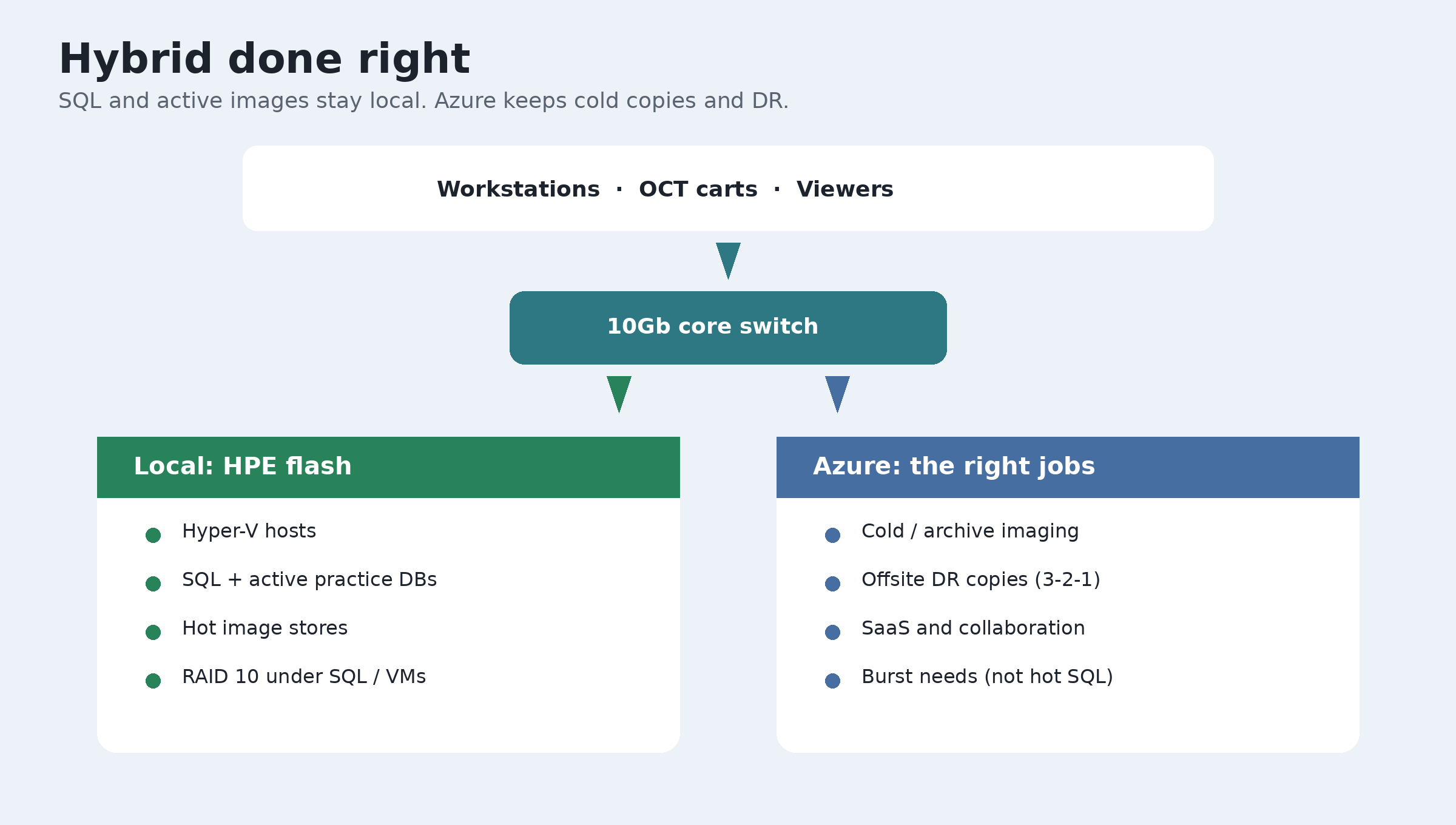
Hybrid is normal. The mistake is calling a network-remote SQL disk “hot” and expecting it to feel like a local NVMe array.
OCT and imaging software
Eye care IT often includes an OCT or ophthalmic imaging suite plus a practice SQL system. Names you will hear in the market include Axis Medical’s OCT line (for example Optopol Revo and Huvitz HOCT / OCTavius class devices), ZEISS FORUM / CIRRUS, Heidelberg HEYEX 2 / Spectralis, Topcon Harmony / Maestro, and Optovue Avanti.
Whatever suite you run, the pattern is the same: big studies land on disk, and SQL (or SQL-backed practice software) has to keep up. The brand on the OCT cart does not change the physics. Fast local storage and a fat network still matter.
Want a clear map of your stack?
If SQL feels like a pig and imaging feels stuck behind it, you do not need another vague “cloud optimization” slide. You need a clear map: what stays local on HPE-class flash, how RAID 10 and RAID 6 are split, whether 10Gb is in place, and what Azure should own instead.
Our IT specialists work with SQL, big data patterns, and enterprise storage arrays every day. They can walk your stack with you in plain words. No jargon dump. No scare story. Just a straight answer for the owner.
Or call (604) 813-7881 and ask for Tony.